Part of the PolicyTrace series
Document AIThe folder my privacy story forgot
PolicyTrace masked personal data before the model saw it, yet the same container kept the unmasked text in a debug folder. How it is deployed, the fix, and what stands between the demo and real policies.

PolicyTrace masks names, phone numbers and most place names before any text goes to the model. I've said that in most of what I've written about it, and it's true. While checking the deployment for this post, I found that the same container was also writing the unmasked text of every uploaded PDF to disk, and never deleting it. That's fixed now.
On the public demo the risk was small, because the only documents anyone should upload are the synthetic ones in the repo. But it's a good example of what separates a working demo from something you could point at real policies, so I'll start there.
The folder nobody cleaned up
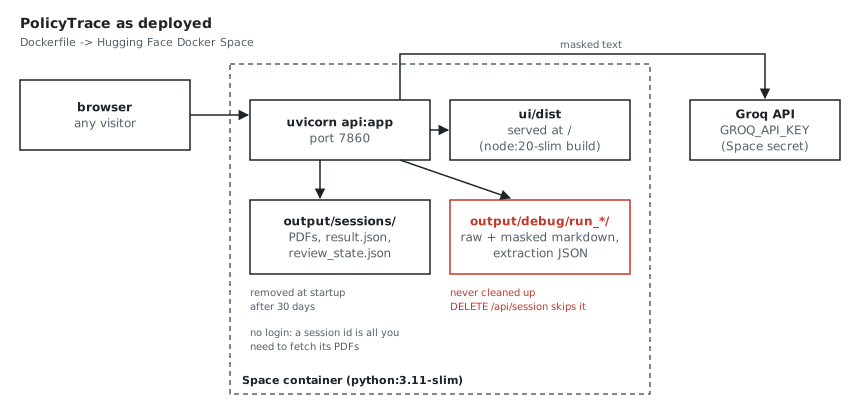
config/settings.yaml has a debug section, and it was switched on. For every run, src/api.py created output/debug/run_<timestamp>/, and src/agents.py wrote four things into it for each PDF: the raw Markdown from Docling, the masked Markdown that went to Groq, the extraction JSON and a line of timing metrics. The raw Markdown is the document before masking, names and all.
Uploads themselves live in a separate folder, output/sessions/. That one does get tidied: when it starts, the API deletes session folders older than session_ttl_days, which is 30. There's also a DELETE /api/session/{id} endpoint whose docstring said it removed "all debug artifacts for this session". It didn't. It deleted the session folder, and the debug folder was somewhere else, named by timestamp rather than session id.
None of this was hidden. Debug output was the right default while I was building the extraction, because reading the masked Markdown is how you find out what Presidio missed. I just never went back and changed the default when the app went public.
The fix was small. Debug output is now off by default, and when you switch it on, the API writes it to a debug/ folder inside the session, so deleting the session or the 30-day cleanup removes it too. A test in tests/test_settings.py fails if the default is ever switched back on. The change is on GitHub and the live Space.
It's worth being exact about what masking covers. Presidio catches most names and town names, but it has no rule for UK postcodes, and street lines often get through, so the overnight postcode and much of each address reach Groq as written. So do dates of birth (dates aren't masked, because the extraction needs them), the policy number, the registration and the car, occupations, licence types, claims and convictions, and every premium and excess. A name Presidio misses goes to the model too. You'd spot it in the record, because it shows up as a real name where the others are MASKED_ tokens. Unmasked text also stays in the container: the uploaded PDFs, and the source snippets saved with each highlight in result.json. Both sit in the session folder until the session is deleted, or until the API next starts after 30 days. Before real policies went through it, I'd want a data-processing agreement with the model provider, a postcode recogniser, and a measured check of what Presidio misses on real layouts.
How it's deployed
The deployment itself is deliberately small. PolicyTrace is a FastAPI backend and a React frontend, so it runs as a Docker Space on Hugging Face rather than a Gradio or Streamlit app. The Dockerfile has two stages:
node:20-slimrunsnpm ciandnpm run buildto produceui/dist.python:3.11-sliminstallsrequirements.txt, downloads the small spaCy model Presidio needs, copies the code and the built UI, and startsuvicorn api:appon port 7860.
FastAPI serves the API under /api/* and the React app for everything else, with a fallback to index.html so a refreshed page still works. Locally I run them separately, Vite on 5173 and the API on 8000. The Groq key is a Space secret, and the model names can be overridden with GROQ_MODEL and GROQ_CLASSIFIER_MODEL.
There's no CI. The repo has no .github/workflows, and the Space rebuilds whenever new code is pushed to it. With 32 fast unit tests, that's an easy thing to add, and it's on the list.
What I'd change before a real policy went through it
The debug folder was the first fix, and it's done. What's left is mostly about who can do what.
- Sign-in. There's none. A session id is all you need to fetch its PDFs from
/api/pdf/{session_id}/{filename}. The ids are random UUIDs, which is fine for a demo and not an access control. - Named reviewers and a history. Review actions are saved in
review_state.jsonwith the reviewer set to"anonymous", and a second action on a field overwrites the first. A real review needs to know who did what, and keep every decision. - A queue.
POST /api/processdoes all the work inside the request. The docstring says 30 to 90 seconds, and on Groq's free tier a full pack now takes about three minutes. That should be a background job the UI polls. - Proper storage. Space storage is temporary, which is right for a demo. Real use needs session records in a database, PDFs in object storage, and a retention period someone has agreed to.
- Run records. Each result should record the prompt version, the model and the arbiter rules that produced it, so that a changed answer can be explained later. The pieces exist, with
active_versioninconfig/prompts.yamland the model names in the settings, but nothing writes them onto the result yet.
There's also one smaller thing I noticed while reading the code for this post: the CORS settings in src/api.py only allow localhost origins. That's correct for local development, and harmless on the Space because the UI and API share an origin. It would need revisiting the moment the frontend lived on a different domain.
Why I'm writing this down
A demo that works can hide all of this, because none of it shows up on screen. The upload works, the highlights appear, the conflicts are listed. I'd rather list the gaps myself, with the file names, than have someone find them. It also gives me a to-do list in priority order, and the first item on it is already done.
If you're running your own copy, the deployment notes are in docs/hugging-face.md, and the live demo is the same image. Use the synthetic pack, not your own documents.
AI engineer with 14 years across machine learning and applied AI: prompt design, document AI, LLM workflows and the review loops that make them safe to ship. I build real systems and write up what breaks along the way.
Get the next note by email
Short, first-person notes from real runs. Free.