Part of the PolicyTrace series
Document AIWhere PolicyTrace's highlights go wrong
I checked every highlight from a fresh run. 47 of 59 fields were located, most on the right text. The mistakes cluster in the driver table, and the cause is a tie-break.

In an earlier post I wrote that many of PolicyTrace's highlights land on the field label instead of the value. This week I went back to that claim: I ran the demo pack again and checked every highlight one by one, and the picture was different: kinder to most fields, and harder on a few.
The run extracted 59 fields and found a location for 47. Dates, amounts, the registration, the policy number and the insurer all land on the value, usually on the exact text ("15/04/2026 at 00:00 hours", "GBP 395.00"). The mistakes cluster in one place, the driver table, and they're more interesting than "it picked the label".
How a field gets a highlight
The rule I started from still holds: the model never gives me coordinates. Asking an LLM for "page 1, x 42, y 18" invites it to make up something plausible. So the work is split three ways.
- Docling owns geometry. Before masking, every text element on every page goes into a
ProvenanceCorpuswith its page number and bounding box. Docling measures from the bottom-left in points and the browser draws from the top-left in percent, so_add_prov_item()flips the y axis as it converts. - The model owns a quote. Alongside each value, the extraction prompt asks for
field_citations: the exact phrase from the document, keyed by field path. - The matcher joins them.
build_provenance()walks the Golden Record and fuzzy-matches each field's quote, or its value if there's no quote, against every text item in the Schedule, Certificate and Statement of Fact. The best item above a threshold wins.
What reaches the UI is a small FieldProvenance object: field path, extracted value, matched text, a match score, the file, the page and a padded bounding box. Click a field, and the PDF pane opens that file, scrolls to the page and draws the box.
What went wrong in the driver table
The demo Schedule has a policyholder section on page 1 and a driver table on page 2 with three drivers. Here's what the matcher did with it:
- The policyholder's relationship, "Policyholder", is highlighted on the section heading "Policyholder details".
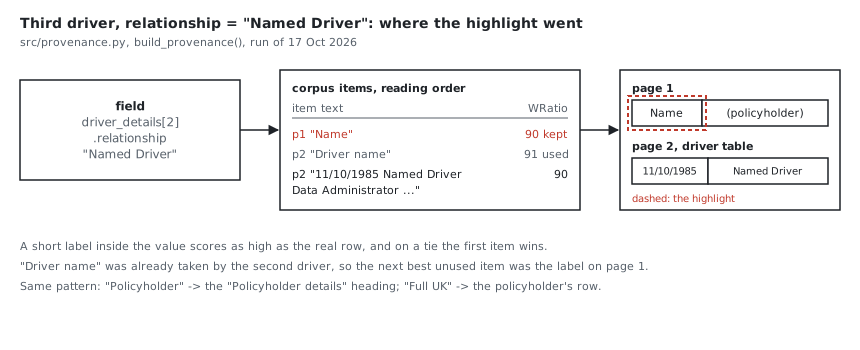
- The two named drivers' relationship, "Named Driver", is highlighted on the "Driver name" column header and on the "Name" label in the policyholder section on page 1.
- The third driver's licence type, "Full UK", points at the policyholder's row. Right words, wrong person.
- One occupation, "Product Manager", is highlighted on a text fragment that just says "Product".
The names themselves get no highlight at all. They're masked before the model sees them, so the record holds tokens like MASKED_PERSON_2, which never appear on the page.
Why it happens
The matcher uses two rapidfuzz scorers: partial_ratio for the model's quotes and WRatio for plain values. Both rate a short item that sits inside the search text very highly. "Name" is inside "Named Driver", and "Policyholder" is inside "Policyholder details". So the label or heading scores as well as the actual table row, or within a point of it.
Then two rules decide the winner. A new item only replaces the best so far if it scores strictly higher, so on a tie the first item in reading order wins, and headings and labels come before table rows. And to stop two fields sharing one box, the matcher prefers positions no other field has used. Once the second driver took the "Driver name" header, the third driver's best unused option was the "Name" label on page 1.
Repeated values are the other half. "Full UK" appears in two driver rows, and "GBP 200.00" appears four times on page 2. The matcher has no idea which row belongs to which driver, so it can find the right words in the wrong place.
That's why a high score here means "this text matches", not "this is where the value is". It matters, because the UI shows that score as a percentage badge next to the field.
What I changed
The fix didn't need a new model or a new library. In build_provenance(), candidates above the threshold are now ranked on four things, in order, before the fuzzy score decides:
- Does the item contain the value? "Driver name" doesn't contain "Named Driver". The driver's row does.
- Is it a heading? Items Docling labels as section headers lose to ordinary text.
- Is it this driver's row? For driver fields, the item that also holds the same driver's other values wins, so the third driver's licence lands on the third driver's row.
- Is the row already taken? Several fields share one driver row, so an unused heading nearby no longer wins just because the row was used by the date of birth.
On a fresh run of the demo pack after the change, every driver field lands on its own row. Five new tests in tests/test_provenance.py rebuild the driver table from the demo and fail on the old code.
What the reviewer does with it
Even a wrong highlight usually lands near the answer, and the reviewer makes the decision. Each field row in ui/src/FieldRow.tsx has three buttons: verify, override (type the correct value) and flag. Each sends a PATCH /api/session/{id}/review to src/api.py, which writes it into review_state.json in the session folder.
Two things about that file are worth being honest about. It's keyed by field path, so a second action on the same field replaces the first, with no history. And the reviewer is recorded as "anonymous", because the UI never sends a name. That's enough to show the workflow. It isn't an audit trail.
Fields with no match get no highlight, and the row says "no source location · check manually". I'd rather show that than a weak guess. Booleans such as is_main_driver are skipped entirely, because "Yes" matches half the page.
The lesson I'm taking
My first summary was a rough impression, and it was wrong in both directions. Counting showed that the matcher was mostly right and wrong in a specific, fixable way. Evidence features fail quietly, so this check now lives in a test, not in my memory of a demo.
The matching code is in src/provenance.py, and you can click through the driver table yourself in the live demo.
AI engineer with 14 years across machine learning and applied AI: prompt design, document AI, LLM workflows and the review loops that make them safe to ship. I build real systems and write up what breaks along the way.
Get the next note by email
Short, first-person notes from real runs. Free.