Agents & workflows Experiment
The invoice said £244.80. Why did the AI tool show £0?
Who chose zero? I did. Four rules for a failed AI request, replayed on 81 tasks: what each one lets through, and what it costs.

• When an AI request failed, a rule that filled in preset values turned a £244.80 invoice into £0, marked complete. With one in five requests timing out (a rate I chose), wrong results rose from 200 to 578 out of 2,430 runs.
• Trying again fixed temporary timeouts for 570 extra requests. When the service stayed down, it added 946 requests and recovered nothing.
• A backup and an honest “couldn’t check” both cut wrong results. The backup cost more; “couldn’t check” left work for a person.
In my test, an AI tool had 30 seconds to read a made-up invoice. The invoice said £244.80 was due. When the time ran out, the software put £0 in the amount box and marked the job complete.
Who chose zero? I did, when I wrote the rule for what the software should do if the AI failed to reply. To someone reading the result, £0 looks like a checked amount. They have no reason to open the invoice again.
I tried the same example with a rule that gave the AI another chance. This time the software got the right amount on the second try. The total wait in the simulation was just over 31 seconds.
That extra second helped on this invoice. I wanted to know what would happen if the service stayed down.
Four things the software could do
I compared four versions of the same tool. Each could tell when a reply was late, empty, too damaged to read, or refused because of a rate limit. What happened next depended on the rule I gave it.
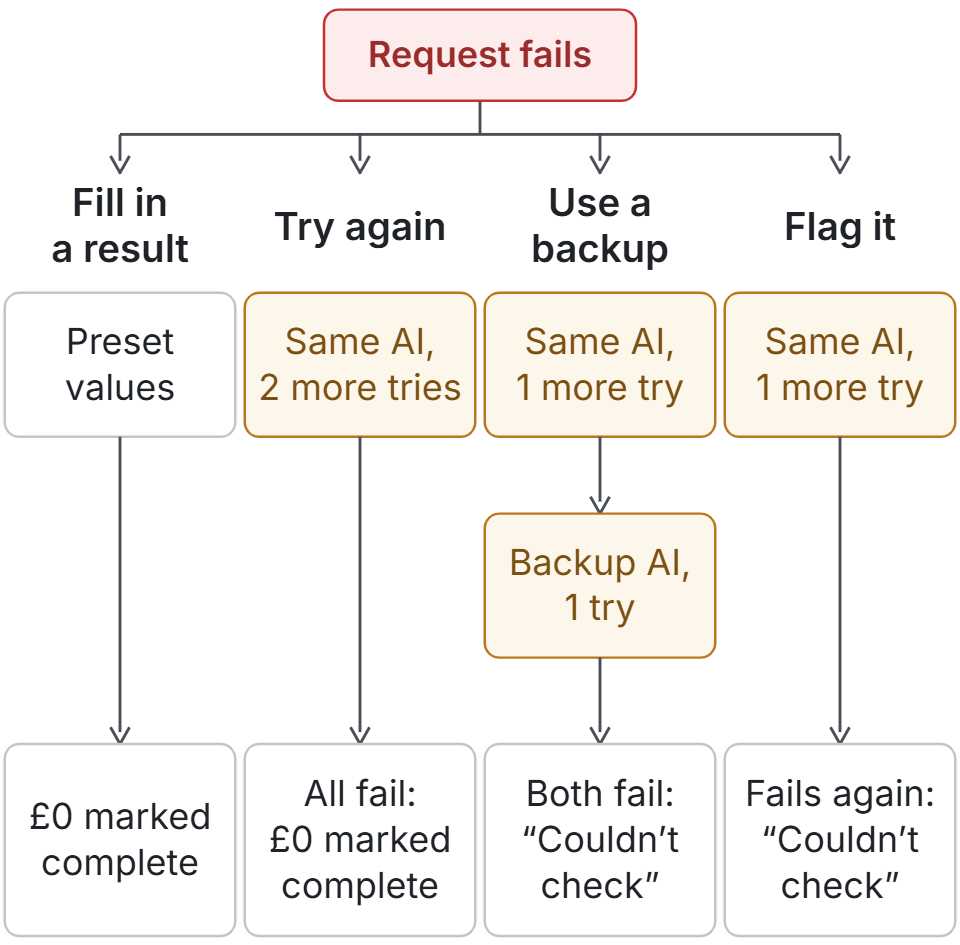
What I tested
The AI was a small, low-cost model, with a larger, pricier model as the backup. I used their saved answers from an earlier experiment: 81 tasks, including reading invoices, choosing an action and working out amounts from a written policy. I replayed each task with three saved answers and ten different patterns of failure. That gave each rule 2,430 runs of the same 81 tasks.
I chose how often failures happened. When a second try succeeded, the test used a saved answer; in a live system, a second reply might be different.
Even with the service working every time, 200 of the 2,430 results were wrong. The AI gave an answer the software could read, but it disagreed with the key. A rule that only steps in when a request fails lets those mistakes through.
When the problem was temporary, a second try helped
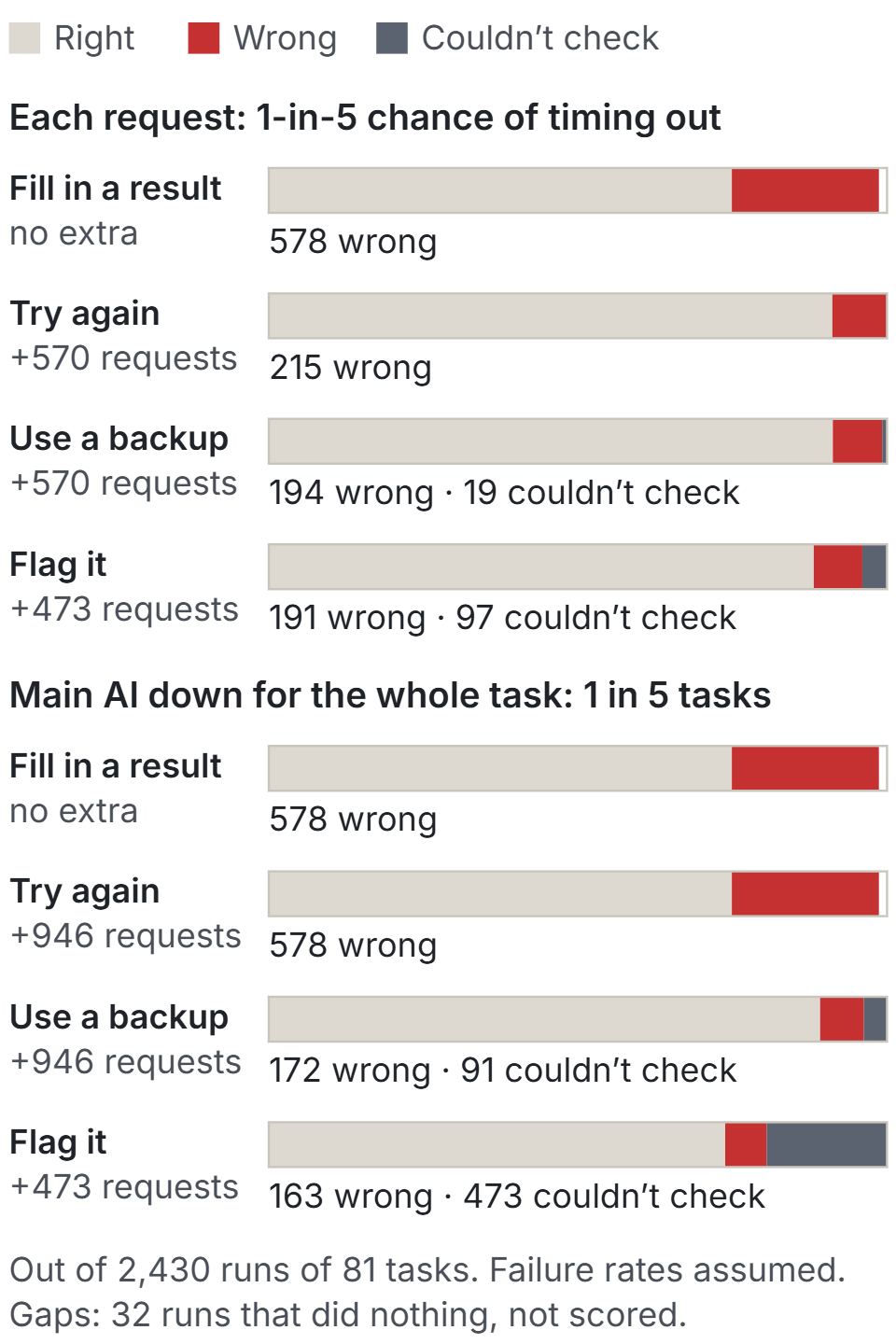
In one test, each request had a one-in-five chance of timing out, and each new try had a fresh chance to get through.
Filling in a result straight away produced 578 wrong results. Trying the same AI again brought that down to 215, for 570 extra requests. That's close to the 200 mistakes with no failures at all.
The backup rule produced 194 wrong results and flagging produced 191, a gap too small to choose between them. The bigger difference for a team was the work left over: with the backup, 19 runs ended with “couldn’t check”; without it, 97 did. At list prices, the backup rule cost about 1.7 times as much as trying again.
When the service stayed down, asking again just took longer
Next, each task had a one-in-five chance of losing the main AI for the whole task. That happened in 473 runs, and in each one every request to the main AI failed.
Trying the same AI again added 946 requests and recovered none of the 473. The average wait rose from about 6.5 to 18.8 seconds. Wrong results stayed at 578.
When the backup could still answer, wrong results fell to 172, and 91 runs ended with “couldn’t check”. Flagging left all 473 affected runs for someone to handle. It had the fewest wrong results, 163, partly because it gave the fewest answers. And the backup was simply more accurate on these tasks (79 of 81 right, against 74 or 75 for the main AI). Both details matter when comparing the counts.
In one more version, both AIs lost access together. Asking the backup added 473 requests and recovered nothing. If two services share a provider, or a limit on how many requests you can make, switching between them may leave you waiting on the same problem.
What I would put on the screen
For an invoice tool, I'd give the first AI one more try. If it still failed, I'd use a backup with a separate way to answer. If neither could read the invoice, I'd leave the amount blank and show “We couldn’t check this invoice. Please review it before paying.”
I'd count how often that message appears, and check that someone actually picks those invoices up. A visible warning only helps if the team can finish the work it leaves behind.
It's the same idea as nothing found isn’t the same as nothing checked, and it's how my company pre-screen treats a register that doesn't answer. This test adds the bill.
Limits
- Short, made-up tasks, with one main AI and one backup.
- I chose the one-in-five rates after seeing the results, because they make the differences easy to see. Every rate, including 1% and 5%, is in the repo.
- Waits and costs are estimates from list prices, not bills.
- I chose the preset values. Many real systems raise an error instead.
- Before choosing a rule for a real service, I'd measure how often its requests fail, how long people wait and how many cases a person can review.
The decision behind it
Decision: try once more, then a backup with a separate way to answer, then show “couldn’t check”. Never fill in values that look checked.
Alternative rejected: trying the same AI again on its own. Under a lasting outage it added 946 requests and recovered none of the 473 affected runs.
What it cost: with one-in-five timeouts, 570 extra requests per 2,430 runs, about 1.7 times trying again at list prices, and 19 runs left for a person.
When to revisit: once real failure rates are measured, if the backup shares a provider or a rate limit, or if “couldn’t check” piles up faster than people clear it.
If you use an AI tool to check something important, try letting one request time out. Look at what the next person sees. Can they tell the difference between “£0 is due” and “we don’t know how much is due”?
Code: e02-when-llm-calls-fail on GitHub (start with the notes for readers). It runs offline, with no API keys and no model costs
Data: every run, and all 46 failure settings including 1% and 5%, in the same folder
Related: When to call the expensive model · Version 1 let an AI agent decide. Version 2 lets written rules decide.
Free: the AI Workflow Readiness Checklist
What would your tool show if this invoice timed out?
First published 12 Nov 2026.
AI engineer with 14 years across machine learning and applied AI: prompt design, document AI, LLM workflows and the review loops that make them safe to ship. I build real systems and write up what breaks along the way.
Get the next note by email
One short email when something ships or breaks. Free.